
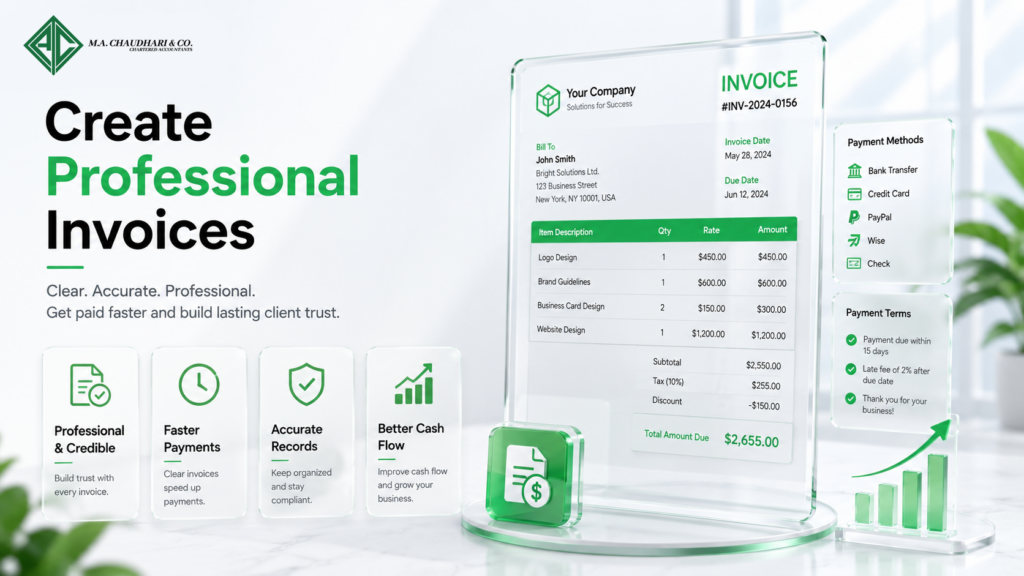
How to Create Professional Invoices
Introduction
Knowing how to create professional invoices is an essential skill for every business owner, freelancer, and service provider. A well-designed invoice does more than request payment. It reflects your brand, builds customer trust, and encourages clients to pay on time. Moreover, professional invoices reduce misunderstandings by clearly outlining products, services, pricing, and payment terms.
Many businesses lose valuable time because of incomplete or confusing invoices. Missing details often lead to payment delays, disputes, and additional administrative work. Therefore, creating accurate and professional invoices should be a priority for every organization.
Fortunately, modern invoicing methods make the process simple and efficient. Whether you invoice a single client or hundreds of customers each month, following the right practices will improve your cash flow and strengthen your business relationships.
What Is a Professional Invoice?
A professional invoice is a formal document that requests payment for products sold or services provided. It includes all the important information a customer needs to process and complete the payment.
Unlike a basic payment request, a professional invoice follows a structured format and presents clear, accurate information. As a result, customers understand exactly what they are paying for and when payment is due.
Professional invoices also serve as official financial records. Businesses use them for bookkeeping, tax reporting, auditing, and financial planning. Therefore, every invoice should be complete, accurate, and easy to understand.
In addition, professional invoices demonstrate credibility. Clients are more likely to trust businesses that present organized and professional billing documents.
Why Professional Invoices Matter
Professional invoices play an important role in maintaining healthy business finances. They improve communication with customers while supporting efficient payment collection.
A professionally prepared invoice also reduces confusion because every charge is clearly explained. Consequently, customers can review and approve payments without unnecessary questions.
Builds Customer Trust
Professional invoices create a positive impression of your business. Customers appreciate clear and organized documents that explain every charge.
Furthermore, consistent invoicing demonstrates professionalism and reliability. This helps strengthen long-term business relationships.
Speeds Up Payment Processing
Invoices with complete and accurate information are easier for customers to process. Therefore, businesses receive payments more quickly.
Clear payment instructions also reduce delays caused by missing information or customer confusion.
Supports Accurate Financial Records
Every invoice becomes part of your financial documentation. Maintaining accurate invoices helps businesses prepare financial statements, monitor revenue, and manage taxes effectively.
Organized invoice records also simplify audits and financial reviews.
Reduces Payment Disputes
Detailed invoices explain products, services, quantities, and pricing clearly. Consequently, customers have fewer questions about their bills.
This transparency reduces disputes and improves customer satisfaction.
Improves Cash Flow
Timely invoicing contributes directly to better cash flow. Businesses that issue professional invoices promptly often receive payments sooner.
As a result, they maintain stronger financial stability and better manage operating expenses.
Essential Elements of a Professional Invoice
Every professional invoice should contain specific information to ensure accuracy and compliance. Including these details helps customers process payments quickly and reduces administrative delays.
Business Information
Every invoice should display your business name, address, phone number, email address, and website if available.
This information allows customers to identify your business and contact you if necessary.
Customer Information
Include the customer’s name, company name, billing address, and contact details.
Accurate customer information ensures the invoice reaches the correct person or department.
Unique Invoice Number
Each invoice should have a unique invoice number. This number helps businesses organize records and track payments efficiently.
Customers also use invoice numbers when making payment inquiries.
Invoice Date
Always include the invoice issue date. This date marks the beginning of the payment period and helps determine payment deadlines.
Keeping accurate dates improves financial recordkeeping.
Payment Due Date
Clearly state when payment is due. Providing a specific due date helps customers prioritize payments and reduces delays.
For example, you may request payment within 15, 30, or 45 days after the invoice date.
Description of Products or Services
Provide a detailed description of every product or service included on the invoice.
Each description should explain what was delivered. Consequently, customers understand every charge without additional clarification.
Pricing Information
List quantities, unit prices, discounts, taxes, and subtotal amounts separately.
Transparent pricing improves customer confidence and reduces billing disputes.
Total Amount Due
Display the final payment amount clearly at the bottom of the invoice.
Making the total highly visible helps customers complete payments quickly.
Accepted Payment Methods
Inform customers about available payment options, such as bank transfers, credit cards, online payment platforms, or checks.
Offering multiple payment methods makes paying your invoice more convenient.
Payment Terms
Include your payment terms, such as late payment fees, early payment discounts, or installment options if applicable.
Clear payment terms help set expectations and encourage timely payments.
Step-by-Step Guide to Creating Professional Invoices
Creating a professional invoice becomes much easier when you follow a consistent process. Each step ensures your invoice is accurate, easy to understand, and ready for prompt payment. Moreover, a structured approach reduces errors and improves customer satisfaction.
Step 1: Use a Professional Invoice Template
Start with a clean and well-organized invoice template. A consistent layout improves readability and strengthens your brand identity.
Choose a template that includes all essential invoice fields. Additionally, leave enough space so customers can review the information quickly.
Step 2: Add Your Business Information
Include your business name, logo, address, phone number, email address, and website at the top of the invoice.
This information helps customers identify your business immediately. Furthermore, it provides clear contact details if they have billing questions.
Step 3: Enter Customer Details
Add the customer’s name, company name, billing address, and contact information carefully.
Always verify customer details before sending the invoice. Consequently, you reduce delivery errors and avoid unnecessary payment delays.
Step 4: Assign a Unique Invoice Number
Every invoice should have its own unique identification number.
A numbering system makes invoices easier to organize, search, and track. It also simplifies accounting and financial reporting throughout the year.
Step 5: Include Invoice and Due Dates
Clearly display the invoice issue date and payment due date.
Specific dates eliminate confusion and encourage customers to process payments on time. Moreover, they help businesses monitor outstanding invoices more effectively.
Step 6: Describe Products or Services Clearly
Provide a detailed description of every product or service included on the invoice.
Include quantities, hours worked, project names, or product codes whenever appropriate. As a result, customers understand exactly what they are paying for.
Step 7: Calculate Prices Accurately
List unit prices, quantities, discounts, taxes, and subtotals separately before showing the final amount due.
Double-check every calculation before sending the invoice. Therefore, you reduce billing errors and improve customer confidence.
Step 8: Add Payment Instructions
Explain how customers can make payment. Include accepted payment methods, bank account details, online payment links, or digital wallet information if available.
Simple payment instructions make the payment process faster and more convenient.
Step 9: Review Before Sending
Always review the invoice for spelling mistakes, incorrect amounts, or missing information.
A final quality check prevents avoidable errors and presents a more professional image to your customers.
Best Practices for Creating Professional Invoices
Following proven invoicing practices improves payment speed and strengthens business relationships. Consistency also helps customers process invoices without confusion.
Send Invoices Immediately
Create and send invoices as soon as work is completed or products are delivered.
Prompt invoicing shortens the payment cycle. Consequently, businesses receive payments sooner and maintain healthier cash flow.
Keep the Design Simple
A clean invoice design looks professional and improves readability.
Avoid unnecessary graphics or excessive colors that distract from important payment information. Instead, focus on clarity and organization.
Use Consistent Branding
Include your company logo, brand colors, and professional fonts on every invoice.
Consistent branding builds trust and makes your invoices instantly recognizable to customers.
State Payment Terms Clearly
Explain payment deadlines, accepted payment methods, and any late payment policies.
Clear payment terms reduce misunderstandings and encourage customers to pay according to your expectations.
Offer Multiple Payment Options
Customers appreciate flexible payment choices.
Providing bank transfers, credit cards, online payment gateways, and digital wallets makes payments more convenient and increases the likelihood of faster payment.
Follow Up Professionally
If a payment becomes overdue, contact the customer politely and professionally.
Friendly reminders often resolve delayed payments without damaging business relationships.
Common Invoice Mistakes to Avoid
Even experienced businesses sometimes make invoicing mistakes. However, avoiding these common errors improves payment speed and customer satisfaction.
Missing Important Information
Invoices without customer details, invoice numbers, or payment terms often create delays.
Always confirm that every required field is complete before sending the invoice.
Incorrect Pricing
Incorrect calculations can damage customer trust and create unnecessary disputes.
Therefore, review prices, taxes, discounts, and totals carefully before finalizing the invoice.
Sending Invoices Late
Late invoicing delays payment collection and affects business cash flow.
Businesses should establish a routine for issuing invoices immediately after completing work.
Using Unclear Descriptions
Generic descriptions may confuse customers and increase billing questions.
Instead, provide detailed explanations of products or services to improve transparency.
Ignoring Outstanding Invoices
Failing to monitor unpaid invoices can create serious financial problems.
Review accounts receivable regularly and follow up with customers whenever payments become overdue.
Invoice Design Tips
A professional invoice should be visually appealing without sacrificing clarity. Good design improves readability and reflects positively on your business.
Use Readable Fonts
Choose clean and professional fonts that are easy to read.
Consistent typography creates a polished appearance while improving customer experience.
Organize Information Logically
Arrange invoice sections in a logical order.
Place business information at the top, customer details below, itemized charges in the center, and payment information at the bottom.
Highlight Important Details
Make the invoice number, due date, and total amount due easy to find.
Bold headings or larger text can draw attention to these important details without making the invoice look cluttered.
Leave Enough White Space
Avoid overcrowding your invoice with unnecessary information.
Adequate spacing makes the document easier to read and gives it a professional appearance.
Tools and Software for Creating Professional Invoices
Modern invoicing tools simplify the billing process and reduce administrative work. Instead of creating invoices manually, businesses can use software to automate invoice creation, payment tracking, and customer management. Consequently, they save time while improving financial accuracy.
The right invoicing software also integrates with accounting systems, making bookkeeping easier and reducing duplicate data entry.
Cloud-Based Invoicing Software
Cloud-based invoicing software allows businesses to create and manage invoices from anywhere. Users can access their accounts through computers, tablets, or smartphones.
Moreover, cloud storage keeps invoice records secure and available whenever they are needed. This flexibility improves collaboration among team members and supports remote work.
Accounting Software with Invoicing Features
Many accounting platforms include built-in invoicing tools. These solutions allow businesses to create invoices, record payments, monitor accounts receivable, and generate financial reports in one system.
As a result, companies maintain more accurate financial records while reducing manual work.
Invoice Template Tools
Invoice template tools provide ready-made layouts that businesses can customize with their branding. These templates include all the essential invoice sections, making it easy to create professional documents quickly.
Furthermore, consistent templates improve brand recognition and create a polished appearance.
Mobile Invoice Applications
Mobile invoicing apps allow business owners and freelancers to create invoices while meeting clients or working outside the office.
Additionally, users can send invoices immediately after completing a project. This approach shortens the payment cycle and improves cash flow.
Tips to Get Paid Faster
Creating a professional invoice is only the first step. Businesses should also follow strategies that encourage customers to pay quickly and consistently.
Invoice Clients Immediately
Send invoices as soon as products are delivered or services are completed. Prompt invoicing keeps the work fresh in the customer’s mind and encourages faster payment.
Moreover, early invoicing improves cash flow and reduces payment delays.
Offer Multiple Payment Methods
Provide several payment options, including bank transfers, credit cards, online payment gateways, and digital wallets.
Flexible payment methods make it easier for customers to complete transactions without unnecessary delays.
Use Clear Payment Terms
State payment terms in simple language. Include the due date, accepted payment methods, and any applicable late payment fees.
Clear expectations reduce misunderstandings and encourage timely payments.
Send Friendly Payment Reminders
Not every late payment is intentional. Sometimes customers simply forget to pay on time.
Therefore, send polite payment reminders before and after the due date. Professional communication often resolves payment delays without creating conflict.
Build Strong Customer Relationships
Customers are more likely to pay businesses they trust. Therefore, maintain professional communication and provide excellent customer service throughout every project.
Strong relationships encourage repeat business and improve payment reliability.
Reward Early Payments
Consider offering a small discount for early payments if it fits your business model.
Early payment incentives encourage customers to settle invoices before the due date and improve cash flow.
How to Handle Late Payments Professionally
Late payments can affect business operations and cash flow. However, handling them professionally helps preserve customer relationships while increasing the likelihood of receiving payment.
Follow Up Promptly
Contact customers shortly after the payment due date. A polite email or phone call often resolves the issue quickly.
Prompt communication also demonstrates that your business monitors outstanding invoices carefully.
Confirm Invoice Receipt
Sometimes customers do not receive the invoice because of email issues or incorrect contact information.
Therefore, confirm that the customer received the invoice before assuming they are refusing payment.
Keep Communication Professional
Remain respectful and professional during every conversation about overdue payments.
Avoid emotional language and focus on finding a practical solution that benefits both parties.
Maintain Accurate Payment Records
Record every payment reminder, customer response, and payment received.
Detailed records help resolve disputes and provide useful documentation if additional action becomes necessary.
Conclusion
Understanding how to create professional invoices is essential for every business and freelancer. A clear, accurate, and well-designed invoice improves customer confidence while reducing payment delays. Moreover, professional invoices support accurate bookkeeping, simplify tax preparation, and strengthen financial management.
By including complete business information, clear descriptions, accurate pricing, and simple payment instructions, you create invoices that customers can process quickly. Furthermore, sending invoices promptly, offering multiple payment methods, and following up professionally can significantly improve your payment collection process.
Modern invoicing software also makes creating and managing invoices much easier. Automation reduces manual work, minimizes errors, and provides valuable financial insights. Therefore, businesses that adopt professional invoicing practices are better positioned to maintain healthy cash flow and achieve long-term success.
Frequently Asked Questions (FAQs)
1. What is a professional invoice?
A professional invoice is a formal billing document that includes business details, customer information, itemized products or services, payment terms, and the total amount due.
2. Why is it important to create professional invoices?
Professional invoices improve credibility, reduce billing errors, encourage faster payments, and help maintain accurate financial records.
3. What information should every professional invoice include?
Every invoice should include your business information, customer details, invoice number, invoice date, payment due date, itemized charges, taxes, total amount due, and payment instructions.
4. How can I make my invoices look more professional?
Use a clean layout, consistent branding, readable fonts, clear item descriptions, accurate pricing, and organized formatting. Also, include your company logo and payment terms.
5. How can I encourage customers to pay invoices faster?
Send invoices immediately, provide multiple payment options, include clear payment terms, and send polite payment reminders before and after the due date.