
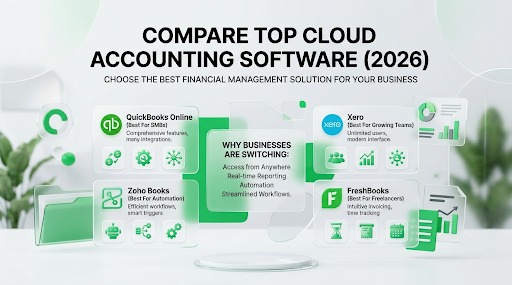
Cloud Accounting Software Comparison
Cloud accounting software has changed the way businesses manage their finances. Instead of installing accounting programs on a single computer, companies can now access their financial data securely from anywhere with an internet connection. This flexibility has made cloud accounting the preferred choice for freelancers, startups, small businesses, and even larger organizations looking to improve efficiency and collaboration.
Modern cloud accounting platforms automate many time-consuming bookkeeping tasks such as importing bank transactions, creating invoices, tracking expenses, reconciling accounts, and generating financial reports. Many also integrate with payroll systems, payment processors, customer relationship management (CRM) software, and e-commerce platforms, allowing businesses to manage multiple operations from one connected ecosystem.
With several excellent accounting platforms available, choosing the right one can feel overwhelming. This guide compares the leading cloud accounting software solutions, highlights their strengths and weaknesses, and explains how to select the best option for your business.
What Is Cloud Accounting Software?
Cloud accounting software is an online financial management system that stores accounting data on secure remote servers instead of a local computer. Users access their financial records through a web browser or mobile application, making it possible to work from virtually anywhere.
Unlike traditional desktop software, cloud accounting platforms update automatically without requiring manual installations. Businesses always have access to the latest features, security improvements, and regulatory updates. Most platforms also provide automatic backups, reducing the risk of losing valuable financial data due to hardware failures.
Another major advantage is collaboration. Business owners, accountants, bookkeepers, and finance teams can securely access the same financial information simultaneously, improving communication and reducing the need to exchange spreadsheets or email attachments.
Why Businesses Are Switching to Cloud Accounting
Key Benefits
Cloud accounting offers several important advantages over traditional bookkeeping methods.
Some of the biggest benefits include:
- Access financial data from anywhere.
- Automatic software updates.
- Secure cloud backups.
- Real-time financial reporting.
- Automatic bank transaction imports.
- Easier collaboration with accountants.
- Reduced manual data entry.
- Improved scalability.
- Integration with other business software.
- Mobile bookkeeping capabilities.
These features help businesses save time while improving bookkeeping accuracy and decision-making.
Potential Limitations
Although cloud accounting provides many benefits, there are some factors to consider before choosing a platform.
Businesses need reliable internet access to use cloud software effectively. Subscription costs can also increase as companies require additional users or advanced features. Data migration from older accounting systems may take time, and employees may require training when adopting new software.
Fortunately, most providers offer free trials and onboarding resources that help businesses transition smoothly.
Essential Features to Compare
Not every accounting platform offers the same capabilities. Before making a decision, compare the features most relevant to your business.
Important features include:
- Bank feeds
- Expense tracking
- Invoice management
- Financial reporting
- Payroll integration
- Inventory management
- Mobile application
- Multi-user access
- Tax support
- Third-party integrations
- Automation tools
- Customer support
Choosing software with the right combination of features reduces manual work while supporting future business growth.
Top Cloud Accounting Software in 2026
Several accounting platforms consistently rank among the best choices for small and medium-sized businesses.
| Software | Best For | Key Strength |
|---|---|---|
| QuickBooks Online | Most small businesses | Comprehensive accounting features |
| Xero | Growing businesses | Unlimited users on many plans |
| Zoho Books | Automation | Excellent workflow automation |
| FreshBooks | Freelancers | Outstanding invoicing |
| Wave | Startups | Free core accounting |
| Sage Accounting | Established businesses | Strong compliance tools |
Each platform serves different business needs, making it important to evaluate your priorities before subscribing.
QuickBooks Online
QuickBooks Online remains one of the most popular cloud accounting solutions because it combines powerful bookkeeping, invoicing, payroll integration, expense management, bank reconciliation, and financial reporting into one platform.
Its extensive integration marketplace makes it suitable for businesses that rely on multiple software applications. Accountants also frequently recommend QuickBooks because many firms already use it for client accounting and tax preparation.
The software supports automation features that reduce repetitive bookkeeping tasks while providing highly customizable financial reports suitable for businesses of various sizes.
Xero
Xero has become a favorite among growing businesses due to its intuitive interface, strong automation capabilities, and collaborative features.
The platform offers bank reconciliation, invoicing, expense management, inventory tracking, project accounting, and financial reporting. Many plans include unlimited users, making Xero particularly attractive for companies with multiple employees or departments requiring accounting access.
Its extensive app marketplace also supports integrations with payroll systems, payment gateways, CRM software, and e-commerce platforms.
Zoho Books
Zoho Books is well known for delivering excellent value through automation. Businesses can automate recurring invoices, payment reminders, expense categorization, and workflow approvals while benefiting from seamless integration with other Zoho applications.
The software is particularly attractive for businesses already using Zoho CRM or other Zoho productivity tools because information flows smoothly between systems.
Its affordable pricing and feature-rich environment make Zoho Books a strong competitor in the cloud accounting market.
FreshBooks
FreshBooks focuses primarily on freelancers, consultants, agencies, and service-based businesses.
Its strengths include professional invoicing, time tracking, expense management, client communication, and recurring billing. Service businesses that bill clients by the hour often find FreshBooks especially useful because tracked time converts directly into invoices.
The platform prioritizes ease of use, making it one of the simplest accounting solutions for entrepreneurs with limited accounting experience.
Wave
Wave stands out because it offers free accounting software with many essential bookkeeping features. Businesses can manage income, expenses, invoices, receipts, and financial reports without paying monthly subscription fees for core accounting functionality.
This makes Wave particularly attractive for freelancers, startups, and micro-businesses operating on limited budgets.
Although premium features such as payroll and payment processing require additional fees, Wave remains one of the strongest free accounting solutions available.
Sage Accounting
Sage Accounting is designed for businesses seeking robust accounting capabilities combined with strong compliance and reporting features.
It offers invoicing, cash flow monitoring, expense tracking, VAT management in supported regions, and detailed financial reporting. Businesses operating in regulated industries often appreciate Sage’s compliance-focused functionality.
Its scalability also makes it suitable for companies expecting significant long-term growth.
Feature Comparison Table
| Feature | QuickBooks Online | Xero | Zoho Books | FreshBooks | Wave | Sage Accounting |
|---|---|---|---|---|---|---|
| Bank Feeds | ✔ | ✔ | ✔ | ✔ | ✔ | ✔ |
| Expense Tracking | ✔ | ✔ | ✔ | ✔ | ✔ | ✔ |
| Invoicing | ✔ | ✔ | ✔ | ✔ | ✔ | ✔ |
| Inventory Management | ✔ | ✔ | ✔ | Limited | No | Limited |
| Payroll Integration | ✔ | ✔ | Available | Available | Paid | ✔ |
| Mobile App | Excellent | Excellent | Excellent | Excellent | Good | Good |
| Financial Reports | Advanced | Advanced | Advanced | Standard | Standard | Advanced |
| Automation | Excellent | Excellent | Excellent | Good | Basic | Good |
| Third-Party Integrations | Extensive | Extensive | Strong | Moderate | Limited | Strong |
| Best For | SMBs | Growing Businesses | Automation | Freelancers | Startups | Established Businesses |
Pricing Considerations
Pricing is one of the most important factors when choosing accounting software, but it should never be the only consideration. A platform with a lower monthly fee may ultimately cost more if it lacks essential features, requires additional third-party subscriptions, or forces employees to spend extra hours performing manual bookkeeping. Instead of focusing solely on subscription costs, businesses should evaluate the overall value each platform provides.
Most cloud accounting providers offer multiple pricing tiers based on the number of users, available features, transaction limits, and advanced capabilities such as payroll or inventory management. Businesses should also consider future growth. Selecting software that supports expansion can prevent costly migrations later. Many providers offer free trials, making it worthwhile to test several platforms before making a long-term commitment.
When comparing pricing, remember to evaluate customer support, security features, automation tools, software updates, integration options, and scalability alongside monthly subscription fees. The cheapest solution is not always the most cost-effective over the long term.
How to Choose the Right Cloud Accounting Software
Selecting the right accounting software begins with understanding your business requirements. A freelancer sending a few invoices each month has very different needs than a retail business managing inventory across multiple locations. Before comparing products, identify your priorities, including invoicing, payroll, inventory management, tax compliance, reporting, automation, and integration with existing business software.
Ease of use should also be a major consideration. Even the most feature-rich platform loses value if employees struggle to navigate it. Look for intuitive dashboards, quality onboarding resources, responsive customer support, and mobile accessibility. Businesses working closely with external accountants should also verify that their accounting professionals are familiar with the chosen platform.
Finally, think beyond your current business size. Growth often brings more employees, customers, transactions, and reporting requirements. Investing in scalable software reduces the need for future migrations and ensures your accounting system continues supporting your business as it expands.
Common Mistakes When Selecting Software
Many businesses rush into purchasing accounting software based solely on advertising or popularity without carefully evaluating whether it matches their operational needs. One common mistake is selecting software because it offers the lowest monthly price while overlooking missing features that later require costly add-ons or manual work. Another frequent error is failing to consider integration with existing systems, resulting in duplicated data entry and inefficient workflows.
Businesses also underestimate the importance of user experience. Complicated software often leads to training challenges, reduced productivity, and accounting errors. Ignoring customer support quality can become problematic when technical issues arise during tax season or financial reporting deadlines. Choosing software without considering future business growth may also force companies to migrate to a new platform sooner than expected.
A thoughtful evaluation process that includes free trials, feature comparisons, stakeholder feedback, and long-term planning significantly increases the likelihood of selecting software that supports both current operations and future success.
Conclusion
Cloud accounting software has transformed the way businesses manage their finances by replacing manual bookkeeping processes with automation, real-time reporting, and secure online access. Instead of being tied to a single computer, business owners, accountants, and finance teams can collaborate from anywhere while working with the same up-to-date financial data. Features such as automatic bank feeds, recurring invoicing, expense tracking, tax calculations, and customizable financial reports reduce administrative work and help organizations make faster, more informed decisions.
The best platform depends entirely on your business needs rather than a single “winner.” QuickBooks Online remains an excellent all-around solution for most small and medium-sized businesses because of its comprehensive accounting features and extensive integration ecosystem. Xero is a strong choice for growing companies that need unlimited users and powerful collaboration tools. Zoho Books stands out for businesses seeking advanced workflow automation and seamless integration with the Zoho ecosystem. FreshBooks is ideal for freelancers, consultants, and service-based businesses that prioritize invoicing and time tracking. Wave offers exceptional value for startups and entrepreneurs looking for free core accounting features, while Sage Accounting provides robust compliance and reporting capabilities for established businesses with more complex financial requirements.
Before making a final decision, take advantage of free trials and product demonstrations whenever possible. Evaluate each platform based on your daily accounting tasks, industry requirements, expected business growth, integration needs, and budget. Investing a little extra time in comparing features today can save countless hours, reduce bookkeeping errors, and provide a scalable financial foundation that supports your business for years to come.
Frequently Asked Questions
1. What is the biggest advantage of cloud accounting software?
The biggest advantage is accessibility. Cloud accounting software allows you to securely access your financial data from anywhere with an internet connection. It also provides automatic backups, real-time collaboration, software updates, and automation features that significantly reduce manual bookkeeping.
2. Which cloud accounting software is best for small businesses?
QuickBooks Online is often considered one of the best options for small businesses because it combines bookkeeping, invoicing, expense tracking, payroll integration, and detailed financial reporting in a single platform. However, the best choice depends on your business size, budget, and specific operational needs.
3. Is free cloud accounting software good enough?
For freelancers, startups, and very small businesses, Wave offers a capable free accounting solution with essential features such as invoicing, expense tracking, and financial reporting. As your business grows, you may require paid software that offers advanced automation, inventory management, payroll, and more comprehensive reporting.
4. Can cloud accounting software integrate with other business tools?
Yes. Most leading cloud accounting platforms integrate with a wide range of third-party applications, including payroll systems, payment gateways, CRM software, inventory management tools, e-commerce platforms, and project management solutions. These integrations help automate workflows and eliminate duplicate data entry.
5. How do I choose the right cloud accounting software?
Start by identifying your business requirements, including invoicing, payroll, inventory management, reporting, tax compliance, and integrations. Compare pricing, ease of use, customer support, scalability, and security features. Testing several platforms through free trials is one of the best ways to determine which solution best fits your business.